
Learn More in the Docs
Try NameQuick on your next batch
Use AI-powered naming rules without leaving your Mac workflow.
What real estate document management software does
Real estate document management software gives teams a controlled place to store, search, secure, and route property paperwork. In practice, that means leases, amendments, inspection reports, disclosures, permits, COIs, appraisals, invoices, vendor contracts, closing files, and client records do not live across email attachments, desktop folders, shared drives, and scanner output.
A full real estate document management system usually includes a central repository, OCR, metadata, version control, access control, audit trails, workflow routing, retention settings, secure sharing, and sometimes e-signatures. Visitt's CRE document management glossary frames the category around traceable records tied to properties, tenants, vendors, compliance, inspections, and portfolio decisions. SuiteFiles' real estate guide describes the everyday goal more simply: bring order to contracts, deeds, leases, and client files so teams can find the right document when work depends on it.
That is the DMS layer. It matters. But it assumes documents arrive in decent shape. They usually do not.
The first mile of real estate document management is uglier: scan_0042.pdf, IMG_8812.HEIC, contract final FINAL.pdf, download (7).pdf, a permit screenshot, a vendor invoice, a lease amendment, and a closing packet all dropped into the same local folder. If those files enter a DMS or transaction room with vague names, your expensive system starts with bad inputs.
NameQuick fits that intake layer. It is a Mac and Windows app for local file naming and organization. It reads file content, including scans and images, proposes meaningful filenames, previews changes, adds Finder tags, and moves files with rules. It does not replace your real estate DMS. It makes the files cleaner before they reach that system.
DMS, transaction management, CRM, cloud storage, and intake cleanup
Search results for real estate document management software mix several product categories. They overlap, but they do not solve the same job.
| Tool category | Primary job | Good fit when | NameQuick boundary |
|---|---|---|---|
| Real estate DMS | Controlled repository for property documents | You need access control, version control, audit trails, security, OCR, retention, and team-wide search | NameQuick is not the repository or compliance layer |
| Transaction management | Run deals from contract to close | You need checklists, deadlines, e-signatures, broker review, and closing coordination | NameQuick does not track deals or signatures |
| CRM | Manage leads, clients, pipeline, and communication | You need contact records, follow-ups, campaigns, and pipeline visibility | NameQuick does not manage client relationships |
| Cloud storage | Sync and share folders | Drive, Dropbox, OneDrive, or iCloud is enough for access and sharing | NameQuick can prepare local or synced folders, but does not manage cloud permissions |
| File-intake cleanup | Make raw local files readable before handoff | The folder is full of vague PDFs, scans, screenshots, docs, and spreadsheets | This is NameQuick's lane |
MyBrokerCloud's real estate transaction management guide describes transaction platforms around workflows, checklists, audit trails, and deal tracking. iHomefinder's CRM feature guide focuses on centralizing client information and automating communication. LexWorkplace's cloud-storage comparison makes the broader DMS distinction: storage and syncing are not the same as document management features such as indexing, version management, search, and audit trails.
The practical takeaway is not "pick one." A real estate team may use all of these. The mistake is expecting a transaction room or CRM to fix local file chaos before upload.
The real estate documents that create file chaos
Real estate work produces mixed document batches. A single property folder might contain:
- lease agreements, renewals, amendments, and notices
- inspection reports, repair estimates, photos, and punch lists
- property tax records, insurance policies, COIs, permits, and certificates
- vendor contracts, maintenance records, invoices, receipts, and quotes
- disclosures, agency agreements, offer packets, and closing documents
- loan files, escrow statements, appraisals, and settlement statements
- Word docs, Excel sheets, PDFs, screenshots, scanned mail, and phone photos
The problem is not only volume. It is inconsistency. One file is named by a vendor portal. Another is a scan. Another has the address in the PDF body but not in the filename. Another is a screenshot of an email. Another is a signed version of a document that still says "draft" because no one renamed it.
That is why document management in real estate needs two layers:
- A system of record for controlled storage, review, collaboration, and retention.
- A repeatable intake process that reads each local file and gives it a useful name before it joins the system of record.
NameQuick is the second layer.
A practical naming convention for property files
For real estate documents, a date-first filename is usually the safest default because Finder, cloud drives, and archives all sort it predictably.
YYYY-MM-DD_Property-or-Client_Document-Type_Optional-Detail.pdf
Use fields that are visible in the file. Do not invent missing data.
| Raw file | Better filename | Why it works |
|---|---|---|
scan_0042.pdf | 2026-03-14_Riverside-Unit-12B_Lease-Amendment_Signed.pdf | Date, property, document type, status |
IMG_8812.HEIC | 2026-05-02_1220-Market-St_Inspection-Report_Photo.HEIC | Photo becomes tied to property and inspection context |
download (7).pdf | 2026-04-30_ACME-Plumbing_Vendor-Invoice_842.10-USD.pdf | Vendor and amount make retrieval easier |
permit.pdf | 2026-02-08_48-Oak-Ave_Building-Permit_Roof.pdf | Permit type and work scope are visible |
closing docs final.pdf | 2026-06-12_Johnson-Closing-Packet_Final.pdf | Closing context and status are clear |
The folder structure should mirror retrieval, not internal debate. For many small teams, this is enough:
Real Estate Documents/
  Properties/
    1220 Market St/
      01 Deals/
      02 Leases/
      03 Inspections/
      04 Vendors/
      05 Permits and Compliance/
      06 Finance and Tax/
      07 Closing/
  Clients/
    Client Name/
      Active/
      Closed/
      Review/
If the address is the thing you search by, lead with the property. If the client is the thing you search by, lead with the client. If you manage commercial real estate portfolios, you may need asset, tenant, vendor, and work-order context instead.
Read each file using its visible text, including scanned pages, and the existing filename. Rename it as YYYY-MM-DD_Property-or-Client_Document-Type_Optional-Detail. Prefer the document date over the download date. Use the property address, tenant, vendor, client, document type, status, invoice amount, permit type, or closing packet label only when visible. Do not guess missing fields. If the document is unclear, add Needs-Review.
How NameQuick cleans the intake layer on Mac
NameQuick is useful when raw real estate files first land in Finder, Downloads, a scanner output folder, a shared client folder, or a local cloud-sync folder.
It reads files before naming them
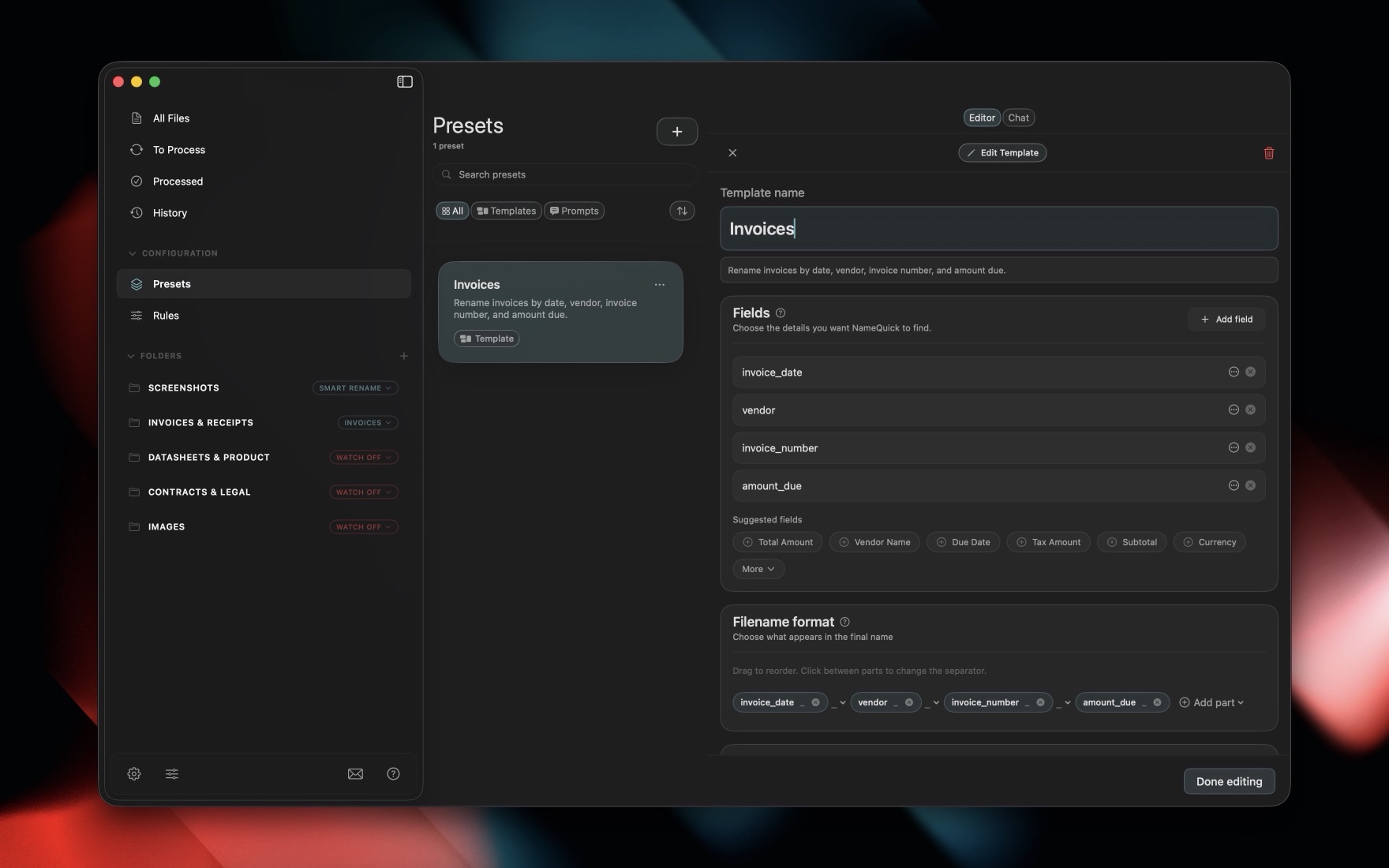
NameQuick can process PDFs, scanned PDFs, images, Word documents, Excel spreadsheets, Apple Pages, Numbers, Keynote, RTFD, CSV, text, and more. The AI model reads scanned documents from the page image; there is no separate local OCR step for naming. The useful real estate fields are often already visible somewhere in the document: property address, tenant, vendor, document date, permit number, invoice amount, lease status, report type, or closing packet label.
It uses naming presets
Use a filename format when the pattern is repeatable, such as vendor invoices or inspection reports. Use written instructions when a folder contains mixed documents and you want a practical naming rule in plain English. Both are saved as naming presets. NameQuick can preview suggested names before applying them, which matters for leases, client files, legal paperwork, and closing documents.
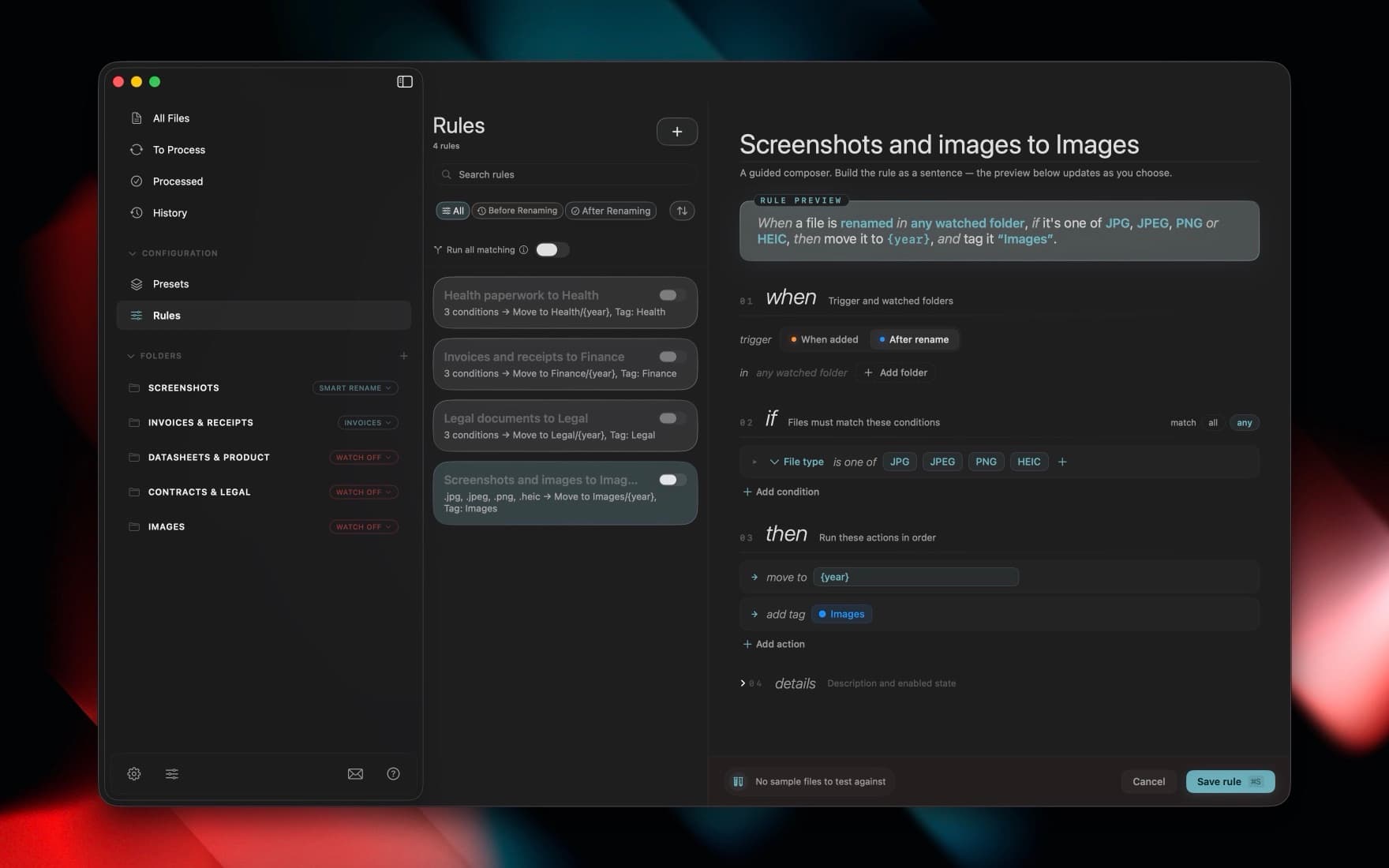
It applies Hazel-like rules after content extraction
NameQuick has if/then rules similar in spirit to Hazel, but the important difference is timing. Rules can run after AI extraction and renaming, so they can act on the new, content-based filename rather than the original one.
Examples:
- If document type is
Lease, move toProperties/{property}/02 Leases/. - If document type is
Inspection Report, add Finder tagInspection. - If vendor is visible and amount is missing, move to
Review/Vendor Docs/. - If status is
Signed, add Finder tagSigned. - If the file type is not supported for the property workflow, leave it in Intake.
It keeps the DMS honest
After cleanup, upload or sync the organized files into the system that owns the official process: Dotloop, Docusign Rooms, SharePoint, Drive, Dropbox, Box, Yardi, MRI, RealPage, a brokerage transaction system, a property archive, or a full DMS.
NameQuick does not claim native integrations with those systems. It prepares the local files so the next system receives documents with clearer names and folder context.
When you need a full real estate DMS
Use a full real estate document management system when the business need is governance, not just cleanup.
Common triggers:
- multiple agents, assistants, brokers, vendors, or clients need controlled access
- you need role-based permissions, secure sharing, and centralized document security
- you need audit trails showing who viewed, changed, approved, or signed a document
- version control must be enforced across the team
- e-signatures, transaction checklists, escrow coordination, or closing workflows are part of the core process
- retention policies, legal holds, broker review, or compliance controls matter
- the repository must be searchable across the whole organization, not only one Mac
Pericent's DMS feature guide lists audit logs, access control, encryption, retention policies, version control, and workflow support as core DMS expectations. Those are not local file-renaming features. They are platform capabilities.
So the decision is straightforward: buy governance when you need governance. Use NameQuick when the immediate work is making raw files readable before governance starts.
When NameQuick is the better first step
NameQuick is a good first step when:
- you are an agent, investor, property manager, coordinator, or small team working from a Mac
- the folder problem is local: scans, downloads, screenshots, PDFs, Word docs, spreadsheets, and photos
- files already end up in Drive, Dropbox, SharePoint, iCloud, or a DMS, but the names are bad
- you want one property-document naming convention instead of manual cleanup
- you want to preview suggested names and undo changes
- you want Finder tags and folder moves without building scripts
- sensitive documents need a choice between Managed, BYOK, and local AI modes
Privacy depends on the mode you choose. With local models such as Ollama or LM Studio (or MLX on Apple Silicon Macs), file content stays on your computer. With Self-Managed/BYOK, the file content, which can include the file itself, goes directly to the provider you choose and not through NameQuick's servers. With Managed, content is processed through NameQuick's EU-routed service to the AI provider for renaming only, held briefly in a private storage bucket and deleted right after processing (automatically within 24 hours at the latest), and never used for training.
Self-Managed has an in-app free trial with 30 renames and no card. Managed includes hosted AI and 30 free renames with no email or card, then 70 more and 14 days of your plan when you add a card. One Managed rename equals one successfully renamed file; failed renames do not count.

Try NameQuick on your next batch
Use AI-powered Presets and pricing that fit batch renaming without rebuilding your workflow.
FAQ
What is the best real estate document management software?
There is no single best tool for every team. A brokerage that needs broker review, e-signatures, deal deadlines, and compliance should evaluate transaction platforms and full DMS tools. A solo agent or investor with messy local files may get more immediate value from cleaning the intake layer first. The right stack might be CRM plus transaction room plus DMS plus NameQuick for local file cleanup.
What are the top real estate document management system features?
Look for a central repository, OCR, full-text search, access control, document security, version control, audit trails, secure sharing, workflow automation, retention controls, and integrations with the tools your team already uses. For active transactions, e-signatures and deadline tracking may matter as much as document storage.
Is Google Drive or Dropbox enough for real estate documents?
Sometimes. Basic cloud storage is fine for simple sync and sharing, especially for small teams with low compliance needs. It is not the same as a DMS with audit trails, version control, permissions, retention, and document profiling. If you keep using cloud storage, make the file-intake layer disciplined so folders do not become a dumping ground.
Can NameQuick replace Dotloop, Docusign Rooms, Yardi, MRI, or SharePoint?
No. NameQuick is a Mac file-renaming and organization app. It does not provide transaction management, e-signatures, CRM, broker compliance, retention policies, shared permissions, escrow workflows, or enterprise document controls. Use it before those systems to clean up local PDFs, scans, photos, Office files, and downloads.
Can NameQuick organize leases, inspection reports, and closing documents?
NameQuick can help rename and organize local files when the useful details are visible in the file content (including scanned pages) or the existing filename. It can identify fields such as date, property, tenant, vendor, document type, status, and amount, then preview a consistent filename. It should not guess missing legal or client-facing information.
How should real estate files be named?
A useful pattern is YYYY-MM-DD_Property-or-Client_Document-Type_Optional-Detail. Keep the date first for sorting, then include the property or client, the document type, and a detail such as signed status, invoice amount, permit type, or closing packet label. Avoid private data in filenames if the folder will be shared broadly.
What is the 80/20 rule for realtors?
The 80/20 rule means a small share of activities usually creates most of the business value. In document work, that means agents should not spend high-value time manually opening and renaming routine files. Keep human review for risky documents, but automate repeatable cleanup such as naming inspection reports, vendor invoices, permits, and closing packet downloads.
Bottom line
Real estate document management software is essential when your team needs a secure repository, audit trails, access control, version control, e-signatures, and workflow governance. But the first bottleneck is often simpler: files arrive on a Mac with names that make them hard to trust, search, and file.
NameQuick solves that first-mile problem. It turns vague local files into readable property documents, applies Finder tags, routes files with rules, and lets your DMS, CRM, transaction platform, or cloud drive start from cleaner inputs.
NameQuick trial terms verified 2026-09-30 against the approved app and Polar offer. See trial and billing details.
NameQuick Team
AuthorThe NameQuick team writes practical guides for file organization, document workflows, and automation with NameQuick.