For bookkeeping services and independent accountantsRequest a pilot seat

See every morning which of your clients are ready to close.

Every payment has its receipt — and you can prove it.

NameQuick Invoices reconciles your client's bank statement (camt.053 or CSV) against the invoices that arrived — to the cent. If a booking has no receipt, you request it from the sender, tied to that exact transaction. At month-end: a DATEV export and a close report documenting what was handed over.
Personal onboarding. Limited seats, cancel monthly.

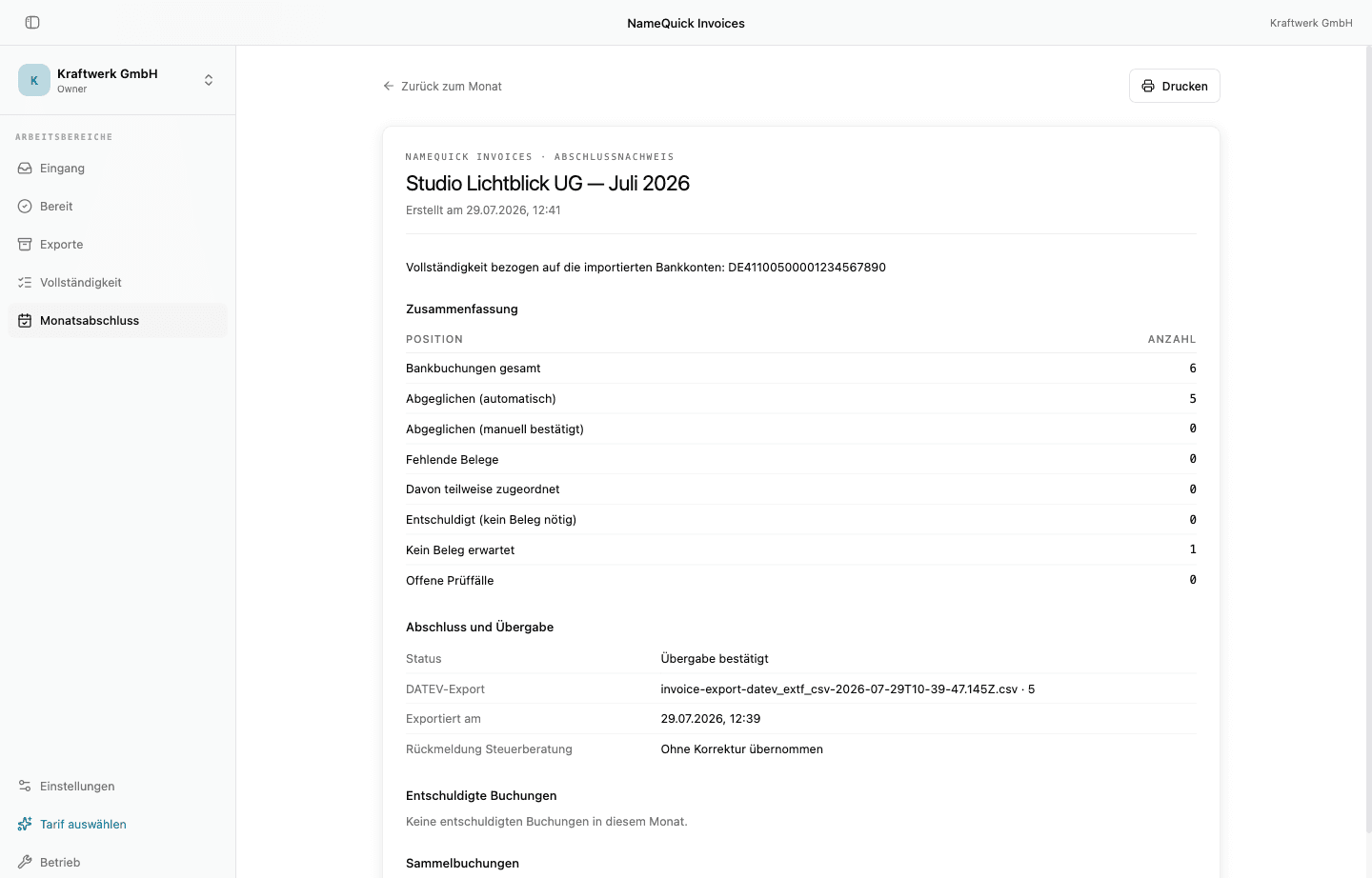
Month-end close cockpit: three clients with status, missing receipts and open items
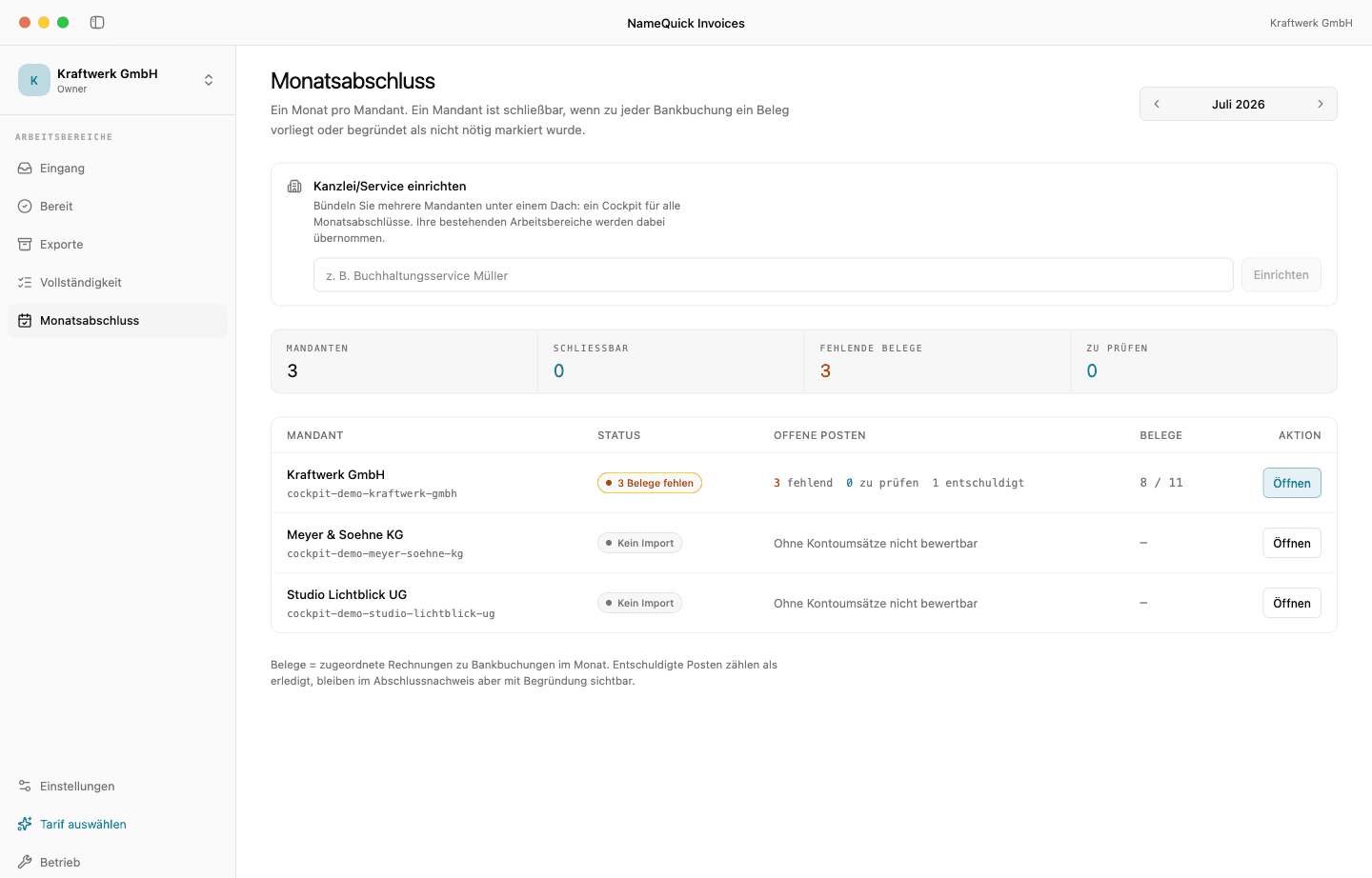
A client's month detail: the list of missing receipts per bank booking with date and amount
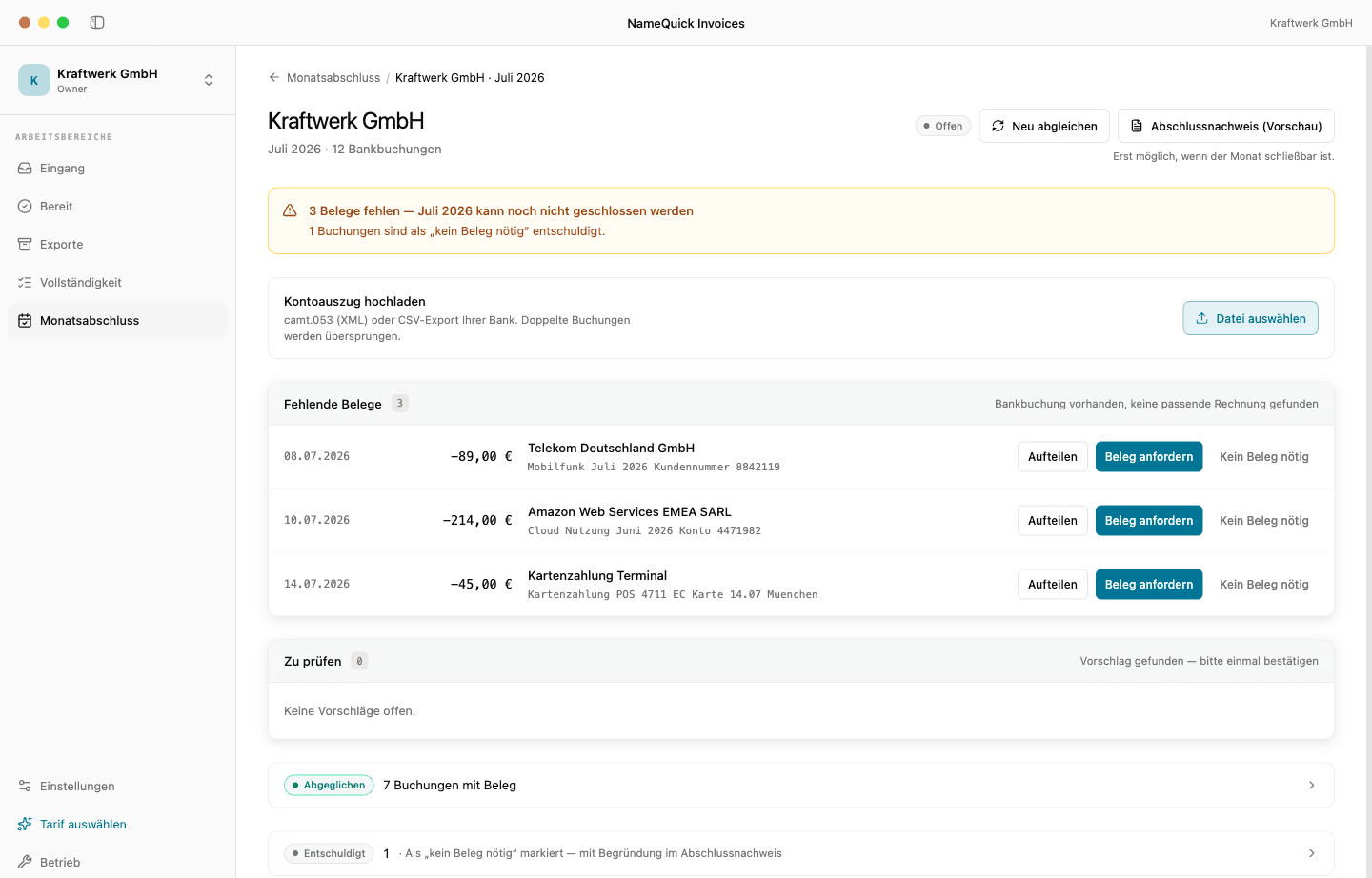
A client's close report with summary, DATEV export and confirmed handover
GoBD-supporting workflow
GDPR-compliant
EU hosting
DATEV EXTF export

How it works

From bank statement to close report

Every month-end runs the same way: reconcile, request what's missing, close. You only work the exceptions.

  1. 1

    Upload the bank statement

    camt.053 or CSV from online banking. We need no banking credentials and no account access.

  2. 2

    Invoices arrive

    Forwarded to the workspace address or uploaded directly. XRechnung, ZUGFeRD, PDF, scan, and photo are all read.

  3. 3

    Reconcile to the cent

    Every bank booking gets its invoice. You confirm suggestions once, and split combined bookings across several invoices.

  4. 4

    Request missing receipts

    Each booking without an invoice gets a request to the sender — with an upload link that needs no login. The receipt lands on the right booking.

  5. 5

    Close the month

    DATEV EXTF export plus a close report: what's reconciled, what stays without a receipt for a stated reason, and when it was handed over.

Features

Everything that happens between a payment and its receipt

Six building blocks, one result: a month where every payment has a receipt, or a documented reason why it doesn't.

Bank import by file

Upload the bank statement as a camt.053 or CSV file. No bank connection, no stored credentials — you stay in control of which transactions we see.

camt.053CSV

Receipts come to you

Every workspace has its own email address. Forward invoices, upload files, or pull them in through a request link — attachments are processed automatically.

workspace-id@app.namequick.app

PDFPNGJPGXMLZUGFeRD

Read, don't retype

XML-first for XRechnung and ZUGFeRD, text extraction for digital PDFs, OCR for scans. Every field shows its source and confidence, and anything below the threshold is flagged for review.

XMLPDFOCRAI fallback
Check an e-invoice for free

Cent-accurate reconciliation

Bank booking and invoice are brought together on amount, date, and supplier. Certain matches pass through, suggestions you confirm once, combined bookings you split.

Direct debit Telekom · €89.10Invoice 4711 · €89.10Reconciled
Card payment Fabrikat GmbH · €240.00Receipt missing

Request missing receipts

One request per booking, to the sender, with an upload link that needs no login. Whoever sends the receipt needs no account with us — the file lands on the right payment.

1
Request receipt
2
Requested on Jul 3
3
Receipt received — matched

Close with proof

Approved invoices go out as a DATEV EXTF file. The close report records, per month, what was reconciled, what stays without a receipt for a stated reason, and when it was exported and handed over.

CSV

General

DATEV EXTF

Tax advisors

Close report

Documented handover status

For bookkeeping services

Your clients, sorted by how close they are to done.

Instead of digging through every client folder, you get one list with one status per client and month. You work the exceptions — not the rule.

Ready to close3 receipts missing2 to review
  • One status per client and month: ready to close, receipts missing, or open review cases.
  • Receipt requests go to the sender, tied to the exact transaction, with an upload link that needs no login.
  • Combined bookings and partial payments can be split across several invoices.
  • Bookings without a receipt can be marked “no receipt needed” with a reason — the reason appears in the close report.
  • The close report documents the handover status per month, including the tax advisor's response.
  • Originals stay stored unchanged, and every change is logged.

Pilot seat

€149/month
  • Personal onboarding for your first clients — we run the first close together with you
  • A direct line to the team: your feedback decides what gets built next
  • Cancel monthly, no setup fee

Seats are limited because we run every onboarding ourselves. Write us a line about how many clients you handle.

For freelancers and small businesses

Your receipt ledger: no more missing receipts at month-end.

Forward invoices, upload the bank statement, and see the rest in the cockpit. If a debit has no receipt, you know right away — not when your tax advisor asks.

  • Every debit shows whether its receipt is there.
  • Request missing receipts from the sender in two clicks.
  • At month-end a DATEV export goes to your tax advisor.
  • Originals stay unchanged, and every change is logged.

No card required to start.

Month-end close cockpit: three clients with status, missing receipts and open items

E-invoicing 2027/2028

The mandate arrives in waves. Your invoice intake is already structured.

Since 1 January 2025, every business in Germany must be able to receive e-invoices. From 1 January 2027, businesses with more than €800,000 in prior-year revenue must issue them; from 1 January 2028, everyone else. NameQuick Invoices reads XRechnung and ZUGFeRD straight from the XML and validates incoming e-invoices as they arrive — so you notice early when a supplier sends something broken.

Need to check a single file? Our tools are free and need no sign-up:

3

Ways receipts arrive (email, upload, request link)

5

Receipt formats (PDF, PNG, JPG, XRechnung, ZUGFeRD)

2

Export formats (CSV + DATEV EXTF)

Pricing

Simple, transparent pricing

Pricing for your own company. Bookkeeping services and accounting firms start through the pilot seat.

Starter

For freelancers with few documents

9
/month

  • 50 invoices/month
  • CSV export
  • 1 workspace
Recommended

Core

For small businesses

19
/month

  • 200 invoices/month
  • CSV + DATEV export
  • 3 workspaces
  • Forwarding inbox

Team

For companies with several departments

39
/month

  • 1,000 invoices/month
  • CSV + DATEV export
  • Unlimited workspaces
  • Forwarding inboxes
  • Team members

Do you keep the books for several clients?

Cockpit across all clients · personal onboarding · cancel monthly

Pilot seat — €149/month

FAQ

Frequently asked questions

Two ways to close the month cleanly.

Handling clients? Then we set up the first close together. Doing your own books? Then start right away.

No card required to start. Cancel anytime.