
Immobilien-Dokumentenmanagement: Erst den Eingang aufraeumen
Soll das automatisch passieren? Download auswählen
Mehr in der Dokumentation
NameQuick ausprobieren
KI-gestützte Umbenennungsregeln direkt auf Ihrem Mac.
Was Immobilien-Dokumentenmanagement-Software leistet
Immobilien-Dokumentenmanagement-Software gibt Teams einen kontrollierten Ort, an dem sie Objektunterlagen speichern, suchen, schuetzen und weiterleiten koennen. In der Praxis bedeutet das: Mietvertraege, Nachtraege, Pruefberichte, Offenlegungen, Genehmigungen, COIs, Gutachten, Rechnungen, Lieferantenvertraege, Closing-Dateien und Kundendaten liegen nicht verteilt in E-Mail-Anhaengen, Desktop-Ordnern, Shared Drives und Scanner-Ausgaben.
Ein vollwertiges real estate document management system enthaelt meist ein zentrales Repository, OCR, Metadaten, Version Control, Access Control, Audit Trails, Workflow-Routing, Aufbewahrungseinstellungen, sichere Freigaben und manchmal E-Signaturen. Das CRE-Glossar von Visitt beschreibt die Kategorie als nachvollziehbare Dokumentation, die mit Objekten, Mietern, Lieferanten, Compliance, Inspektionen und Portfolio-Entscheidungen verbunden ist. Der Immobilien-Leitfaden von SuiteFiles beschreibt das Alltagsziel einfacher: Ordnung in Vertraege, Urkunden, Mietunterlagen und Kundendateien bringen, damit Teams das richtige Dokument finden, wenn Arbeit davon abhaengt.
Das ist die DMS-Schicht. Sie ist wichtig. Aber sie setzt voraus, dass Dokumente in halbwegs ordentlichem Zustand ankommen. Meist tun sie das nicht.
Der erste Schritt im Immobilien-Dokumentenmanagement ist haesslicher: scan_0042.pdf, IMG_8812.HEIC, contract final FINAL.pdf, download (7).pdf, ein Screenshot einer Genehmigung, eine Lieferantenrechnung, ein Mietvertragsnachtrag und ein Closing-Paket landen im selben lokalen Ordner. Wenn solche Dateien mit schwachen Namen in ein DMS oder einen Transaktionsraum gelangen, startet selbst ein teures System mit schlechten Eingangsdaten.
NameQuick passt genau in diese Eingangsschicht. Es ist eine Mac-App fuer lokale Dateibenennung und Organisation. Sie liest Dateiinhalte, nutzt OCR fuer Scans und Bilder, schlaegt sinnvolle Dateinamen vor, zeigt Aenderungen in der Vorschau, setzt Finder-Tags und verschiebt Dateien per Regeln. NameQuick ersetzt kein Immobilien-DMS. Es macht Dateien sauberer, bevor sie dieses System erreichen.
DMS, Transaktionsmanagement, CRM, Cloud-Speicher und Eingangskontrolle
Suchergebnisse fuer real estate document management software vermischen mehrere Produktkategorien. Sie ueberschneiden sich, loesen aber nicht denselben Job.
| Tool-Kategorie | Hauptaufgabe | Gute Wahl, wenn | Grenze von NameQuick |
|---|---|---|---|
| Immobilien-DMS | Kontrolliertes Repository fuer Objektunterlagen | Sie Zugriffskontrolle, Versionierung, Audit Trails, Sicherheit, OCR, Aufbewahrung und teamweite Suche brauchen | NameQuick ist nicht Repository oder Compliance-Schicht |
| Transaktionsmanagement | Deals vom Vertrag bis Closing steuern | Sie Checklisten, Fristen, E-Signaturen, Broker-Review und Closing-Koordination brauchen | NameQuick verfolgt keine Deals und Signaturen |
| CRM | Leads, Kunden, Pipeline und Kommunikation verwalten | Sie Kontakte, Follow-ups, Kampagnen und Pipeline-Sichtbarkeit brauchen | NameQuick verwaltet keine Kundenbeziehungen |
| Cloud-Speicher | Ordner synchronisieren und teilen | Drive, Dropbox, OneDrive oder iCloud fuer Zugriff und Teilen reichen | NameQuick kann lokale oder synchronisierte Ordner vorbereiten, verwaltet aber keine Cloud-Berechtigungen |
| Dateieingang aufraeumen | Rohdateien lokal lesbar machen | Der Ordner ist voll mit unklaren PDFs, Scans, Screenshots, Docs und Tabellen | Das ist die Staerke von NameQuick |
Der Guide von MyBrokerCloud zu Real Estate Transaction Management beschreibt Transaktionsplattformen rund um Workflows, Checklisten, Audit-Trails und Deal-Tracking. Der CRM-Guide von iHomefinder fokussiert auf zentrale Kundendaten und automatisierte Kommunikation. Der Cloud-Speicher-Vergleich von LexWorkplace macht die groessere DMS-Abgrenzung klar: Speichern und Synchronisieren ist nicht dasselbe wie Dokumentenmanagement mit Indexierung, Versionierung, Suche und Audit-Trails.
Die praktische Konsequenz lautet nicht "entscheiden Sie sich fuer nur eines". Ein Immobilienteam kann alle diese Schichten nutzen. Der Fehler ist, von einem Transaktionsraum oder CRM zu erwarten, dass es lokale Dateichaos schon vor dem Upload behebt.
Welche Immobilienunterlagen Dateichaos erzeugen
Immobilienarbeit produziert gemischte Dokumentenstapel. In einem einzigen Objektordner koennen liegen:
- Mietvertraege, Verlaengerungen, Nachtraege und Mitteilungen
- Pruefberichte, Reparaturangebote, Fotos und Punch Lists
- Grundsteuerunterlagen, Versicherungen, COIs, Genehmigungen und Zertifikate
- Lieferantenvertraege, Wartungsunterlagen, Rechnungen, Belege und Angebote
- Offenlegungen, Maklervertraege, Angebotsmappen und Closing-Dokumente
- Darlehensunterlagen, Escrow-Statements, Gutachten und Settlement Statements
- Word-Dateien, Excel-Tabellen, PDFs, Screenshots, gescannte Post und Handyfotos
Das Problem ist nicht nur die Menge. Es ist die Uneinheitlichkeit. Eine Datei wird von einem Lieferantenportal benannt. Eine andere ist ein Scan. Eine dritte enthaelt die Adresse im PDF, aber nicht im Dateinamen. Eine vierte ist ein Screenshot aus einer E-Mail. Eine fuenfte ist die unterschriebene Version, heisst aber noch "draft", weil niemand sie umbenannt hat.
Deshalb braucht Dokumentenmanagement in Immobilien zwei Schichten:
- Ein System of Record fuer kontrollierte Ablage, Review, Zusammenarbeit und Aufbewahrung.
- Einen wiederholbaren Eingang, der jede lokale Datei liest und ihr einen nuetzlichen Namen gibt, bevor sie in dieses System gelangt.
NameQuick ist die zweite Schicht.
Eine praktische Namenskonvention fuer Objektdateien
Fuer Immobiliendokumente ist ein Datum-am-Anfang-Format meist der sicherste Standard, weil Finder, Cloud-Drives und Archive damit vorhersehbar sortieren.
YYYY-MM-DD_Objekt-oder-Kunde_Dokumenttyp_Optionales-Detail.pdf
Nutzen Sie nur Felder, die in der Datei sichtbar sind. Fehlende Daten sollten nicht erfunden werden.
| Rohdatei | Besserer Dateiname | Warum das funktioniert |
|---|---|---|
scan_0042.pdf | 2026-03-14_Riverside-Unit-12B_Mietvertragsnachtrag_Unterschrieben.pdf | Datum, Objekt, Dokumenttyp, Status |
IMG_8812.HEIC | 2026-05-02_1220-Market-St_Pruefbericht_Foto.HEIC | Foto wird mit Objekt und Inspektion verbunden |
download (7).pdf | 2026-04-30_ACME-Plumbing_Lieferantenrechnung_842.10-USD.pdf | Lieferant und Betrag erleichtern Suche |
permit.pdf | 2026-02-08_48-Oak-Ave_Baugenehmigung_Dach.pdf | Genehmigungstyp und Umfang sind sichtbar |
closing docs final.pdf | 2026-06-12_Johnson-Closing-Paket_Final.pdf | Closing-Kontext und Status sind klar |
Die Ordnerstruktur sollte der spaeteren Suche folgen, nicht interner Theorie. Fuer viele kleine Teams reicht:
Immobilienunterlagen/
  Objekte/
    1220 Market St/
      01 Deals/
      02 Mietvertraege/
      03 Inspektionen/
      04 Lieferanten/
      05 Genehmigungen und Compliance/
      06 Finanzen und Steuern/
      07 Closing/
  Kunden/
    Kundenname/
      Aktiv/
      Abgeschlossen/
      Review/
Wenn die Adresse das wichtigste Suchfeld ist, fuehren Sie mit dem Objekt. Wenn der Kunde das wichtigste Suchfeld ist, fuehren Sie mit dem Kunden. Bei Commercial Real Estate koennen Asset-, Mieter-, Lieferanten- und Work-Order-Kontext wichtiger sein.
Lies jede Datei ueber sichtbaren Text, OCR-Text, Metadaten und den bisherigen Dateinamen. Benenne sie als YYYY-MM-DD_Objekt-oder-Kunde_Dokumenttyp_Optionales-Detail. Bevorzuge das Dokumentdatum vor dem Downloaddatum. Nutze Objektadresse, Mieter, Lieferant, Kunde, Dokumenttyp, Status, Rechnungsbetrag, Genehmigungstyp oder Closing-Paket nur, wenn diese Angaben sichtbar sind. Errate keine fehlenden Felder. Wenn das Dokument unklar ist, fuege Needs-Review hinzu.
Wie NameQuick den Dateieingang auf dem Mac aufraeumt
NameQuick ist nuetzlich, wenn rohe Immobilienunterlagen zuerst in Finder, Downloads, einem Scanner-Ordner, einem gemeinsamen Kundenordner oder einem lokal synchronisierten Cloud-Ordner landen.
Es liest Dateien vor dem Benennen
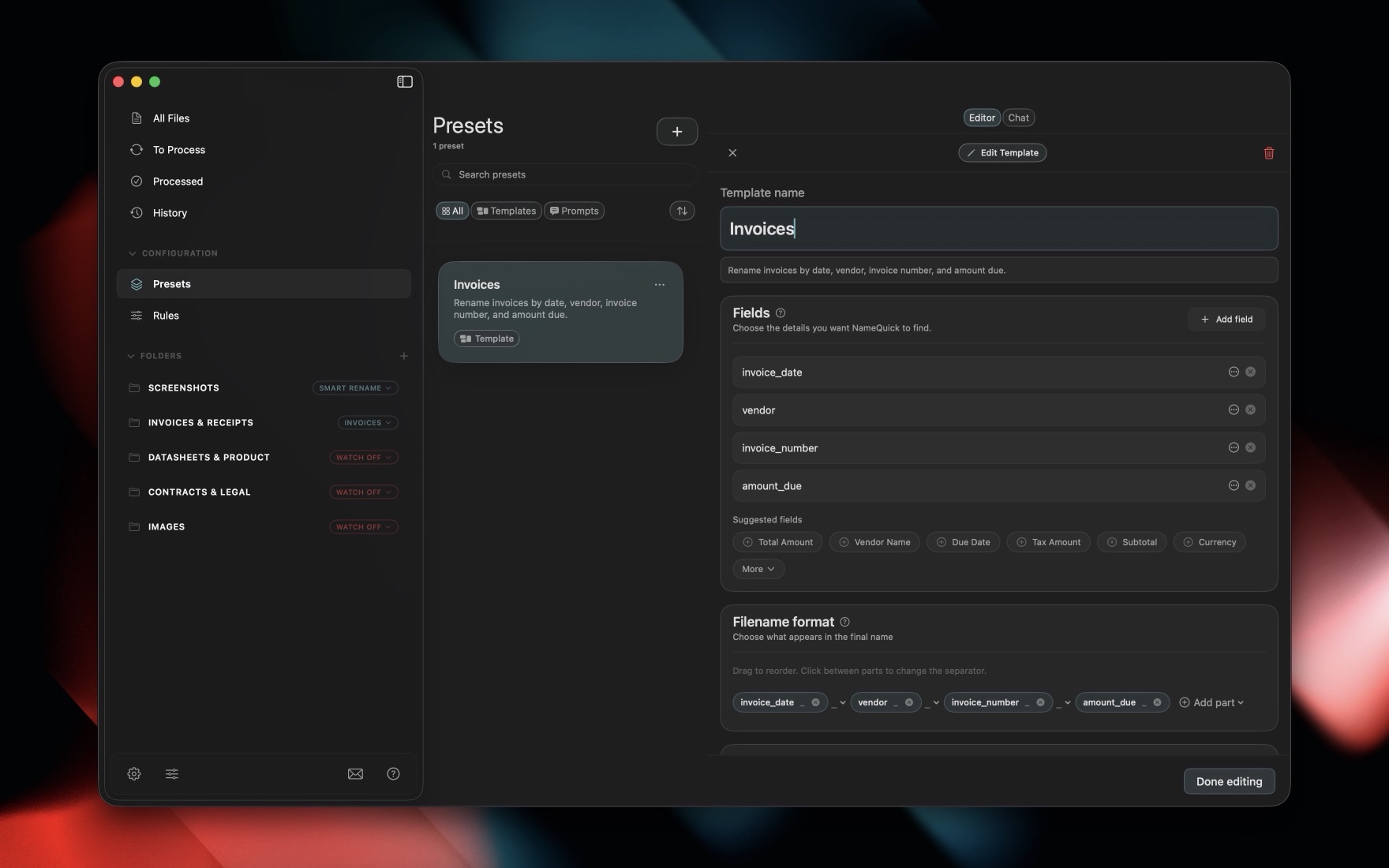
NameQuick kann PDFs, gescannte PDFs, Bilder, Word-Dokumente, Excel-Tabellen, Apple Pages, Numbers, Keynote, RTFD, CSV, Text und mehr verarbeiten. OCR fuer gescannte Dokumente laeuft lokal auf dem Mac. Die nuetzlichen Immobilienfelder sind oft irgendwo im Dokument sichtbar: Objektadresse, Mieter, Lieferant, Dokumentdatum, Genehmigungsnummer, Rechnungsbetrag, Mietvertragsstatus, Berichtstyp oder Closing-Paket.
Zwei Wege zur Benennungsvorlage
Nutzen Sie ein Dateinamenformat, wenn das Muster wiederholbar ist, etwa bei Lieferantenrechnungen oder Inspektionsberichten. Nutzen Sie schriftliche Anweisungen, wenn ein Ordner gemischte Dokumente enthaelt und Sie eine praktische Benennungsregel in normaler Sprache brauchen. NameQuick speichert beides als Benennungsvorlage und kann vorgeschlagene Namen vor dem Anwenden anzeigen, was bei Mietvertraegen, Kundendateien, rechtlichen Unterlagen und Closing-Dateien wichtig ist.
Es nutzt Hazel-aehnliche Regeln nach der Inhaltserkennung
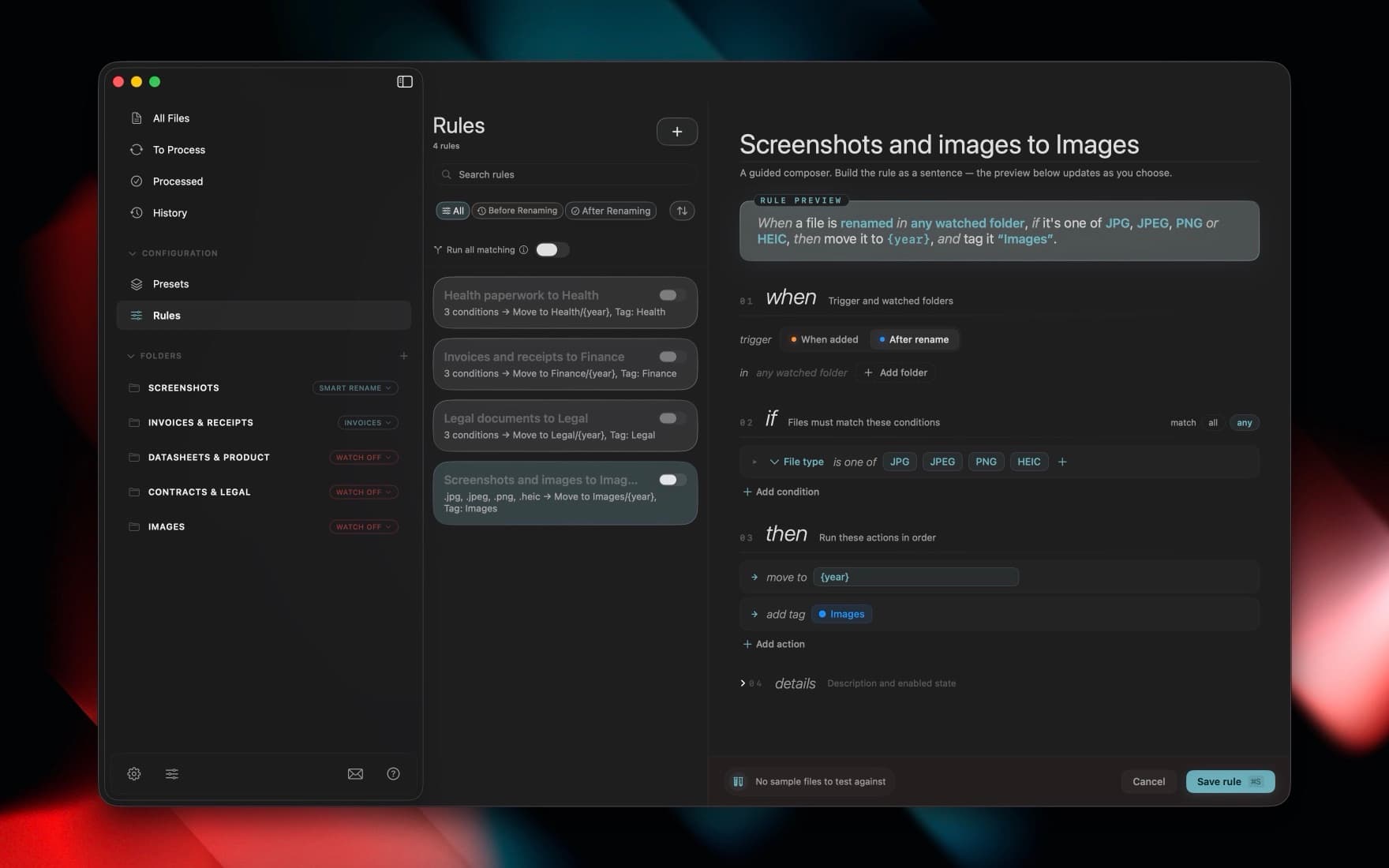
NameQuick hat Wenn-Dann-Regeln, die Hazel aehneln. Der wichtige Unterschied ist der Zeitpunkt. Regeln koennen nach KI-Extraktion und Umbenennung laufen, also auf extrahierten Dokumentkontext reagieren statt nur auf Dateinamen-Metadaten.
Beispiele:
- Wenn Dokumenttyp
Mietvertragist, verschiebe nachObjekte/{objekt}/02 Mietvertraege/. - Wenn Dokumenttyp
Pruefberichtist, setze den Finder-TagInspektion. - Wenn Lieferant sichtbar ist und Betrag fehlt, verschiebe nach
Review/Lieferantenunterlagen/. - Wenn Status
Unterschriebenist, setze den Finder-TagSigned. - Wenn der Dateityp nicht zur Objektlogik passt, lasse ihn im Eingang.
Es macht das DMS sauberer
Nach dem Aufraeumen laden oder synchronisieren Sie die organisierten Dateien in das System, das den offiziellen Prozess besitzt: Dotloop, Docusign Rooms, SharePoint, Drive, Dropbox, Box, Yardi, MRI, RealPage, ein Brokerage-Transaktionssystem, ein Objektarchiv oder ein vollwertiges DMS.
NameQuick behauptet keine nativen Integrationen mit diesen Systemen. Es bereitet lokale Dateien so vor, dass das naechste System klarere Namen und mehr Ordnerkontext erhaelt.
Wann Sie ein vollwertiges Immobilien-DMS brauchen
Nutzen Sie ein vollwertiges real estate document management system, wenn das Geschaeftsproblem Governance ist, nicht nur Aufraeumen.
Typische Ausloeser:
- mehrere Agents, Assistenzen, Broker, Lieferanten oder Kunden brauchen kontrollierten Zugriff
- Sie brauchen rollenbasierte Berechtigungen, sichere Freigaben und zentrale Document Security
- Sie brauchen Audit Trails, die zeigen, wer ein Dokument angesehen, geaendert, genehmigt oder unterschrieben hat
- Version Control muss teamweit erzwungen werden
- E-Signaturen, Transaktions-Checklisten, Escrow-Koordination oder Closing-Workflows sind Kernprozess
- Aufbewahrungsregeln, Legal Holds, Broker Review oder Compliance-Kontrollen sind relevant
- das Repository muss unternehmensweit durchsuchbar sein, nicht nur auf einem Mac
Der DMS-Feature-Guide von Pericent nennt Audit Logs, Access Control, Verschluesselung, Retention Policies, Version Control und Workflow-Unterstuetzung als zentrale DMS-Erwartungen. Das sind keine lokalen Umbenennungsfunktionen. Das sind Plattformfaehigkeiten.
Die Entscheidung ist daher einfach: Kaufen Sie Governance, wenn Sie Governance brauchen. Nutzen Sie NameQuick, wenn die unmittelbare Arbeit darin besteht, Rohdateien lesbar zu machen, bevor Governance beginnt.
Wann NameQuick der bessere erste Schritt ist
NameQuick ist ein guter erster Schritt, wenn:
- Sie als Agent, Investor, Property Manager, Koordinator oder kleines Team auf dem Mac arbeiten
- das Ordnerproblem lokal ist: Scans, Downloads, Screenshots, PDFs, Word-Dateien, Tabellen und Fotos
- Dateien bereits in Drive, Dropbox, SharePoint, iCloud oder ein DMS gelangen, aber schlecht benannt sind
- Sie eine einzige Namenskonvention fuer Objektunterlagen wollen
- Sie vorgeschlagene Namen pruefen und Aenderungen rueckgaengig machen wollen
- Sie Finder-Tags und Ordnerbewegungen ohne Skripte nutzen wollen
- sensible Dokumente eine Wahl zwischen Managed, BYOK und lokalen KI-Modi brauchen
Datenschutz haengt vom gewaehleten Modus ab. Mit lokalen Modellen wie Ollama, LM Studio oder MLX bleiben Dateiinhalte auf Ihrem Mac. Mit Self-Managed/BYOK gehen extrahierter Text oder Bilddaten direkt an den von Ihnen gewaehlten Provider und nicht ueber NameQuick-Server. Mit Managed werden Inhalte ueber den EU-gerouteten NameQuick-Service zum KI-Provider verarbeitet, nur fuer die Umbenennung, kurzzeitig in einem privaten Speicher-Bucket vorgehalten und direkt nach der Verarbeitung geloescht (spaetestens automatisch nach 24 Stunden), und nie fuer Training genutzt.
Self-Managed hat eine kostenlose Testversion in der App mit 50 Umbenennungen und ohne Kreditkarte. Managed nutzt eine Checkout-Testversion, weil gehostete Umbenennungen enthalten sind. Eine Umbenennung pro Datei; fehlgeschlagene Umbenennungen verbrauchen keine Umbenennungen.

NameQuick ausprobieren
KI-gestützte Vorlagen und Preise, die zu Ihrem Batch-Renaming-Workflow passen.
FAQ
Was ist die beste Real Estate Document Management Software?
Es gibt nicht ein bestes Tool fuer jedes Team. Ein Brokerage mit Broker Review, E-Signaturen, Deal-Fristen und Compliance sollte Transaktionsplattformen und vollwertige DMS-Tools pruefen. Ein Solo-Agent oder Investor mit chaotischen lokalen Dateien gewinnt vielleicht zuerst mehr durch einen sauberen Dateieingang. Der passende Stack kann CRM, Transaktionsraum, DMS und NameQuick fuer lokale Dateibereinigung kombinieren.
Welche Funktionen sollte ein Immobilien-DMS haben?
Suchen Sie nach zentralem Repository, OCR, Volltextsuche, Access Control, Document Security, Version Control, Audit Trails, sicheren Freigaben, Workflow-Automation, Retention Controls und Integrationen mit Ihren bestehenden Tools. Bei aktiven Transaktionen koennen E-Signaturen und Fristenverfolgung genauso wichtig sein wie reine Ablage.
Reichen Google Drive oder Dropbox fuer Immobilienunterlagen?
Manchmal. Einfacher Cloud-Speicher reicht fuer Synchronisierung und Teilen, besonders bei kleinen Teams mit geringen Compliance-Anforderungen. Er ist aber kein DMS mit Audit Trails, Versionierung, Berechtigungen, Aufbewahrung und Dokumentprofilen. Wenn Sie Cloud-Speicher weiter nutzen, sollte der Dateieingang diszipliniert sein, damit Ordner nicht zur Ablagehalde werden.
Kann NameQuick Dotloop, Docusign Rooms, Yardi, MRI oder SharePoint ersetzen?
Nein. NameQuick ist eine Mac-App fuer Dateiumbenennung und Organisation. Sie bietet kein Transaktionsmanagement, keine E-Signaturen, kein CRM, keine Broker-Compliance, keine Retention Policies, keine gemeinsamen Berechtigungen, keine Escrow-Workflows und keine Enterprise-Dokumentenkontrollen. Nutzen Sie NameQuick davor, um lokale PDFs, Scans, Fotos, Office-Dateien und Downloads aufzuraeumen.
Kann NameQuick Mietvertraege, Pruefberichte und Closing-Dokumente organisieren?
NameQuick kann lokale Dateien umbenennen und organisieren, wenn die nuetzlichen Details im Dateiinhalt, OCR-Text, in Metadaten oder im bestehenden Dateinamen sichtbar sind. Es kann Felder wie Datum, Objekt, Mieter, Lieferant, Dokumenttyp, Status und Betrag erkennen und daraus einen konsistenten Dateinamen vorschlagen. Fehlende rechtliche oder kundenrelevante Informationen sollte es nicht erraten.
Wie sollten Immobiliendateien benannt werden?
Ein nuetzliches Muster ist YYYY-MM-DD_Objekt-oder-Kunde_Dokumenttyp_Optionales-Detail. Das Datum steht fuer Sortierung am Anfang, danach folgen Objekt oder Kunde, Dokumenttyp und ein Detail wie Unterschriftsstatus, Rechnungsbetrag, Genehmigungstyp oder Closing-Paket. Vermeiden Sie private Daten im Dateinamen, wenn der Ordner breit geteilt wird.
Was bedeutet die 80/20-Regel fuer Realtors?
Die 80/20-Regel bedeutet, dass ein kleiner Teil der Aktivitaeten meist den groessten Geschaeftswert erzeugt. Bei Dokumenten heisst das: Agents sollten nicht ihre wertvollste Zeit damit verbringen, Routine-Dateien manuell zu oeffnen und umzubenennen. Menschliche Pruefung gehoert zu riskanten Dokumenten, wiederholbare Aufraeumarbeiten koennen automatisiert werden.
Fazit
Real estate document management software ist wichtig, wenn Ihr Team ein sicheres Repository, Audit Trails, Access Control, Version Control, E-Signaturen und Workflow-Governance braucht. Der erste Engpass ist aber oft einfacher: Dateien kommen auf dem Mac mit Namen an, die Vertrauen, Suche und Ablage erschweren.
NameQuick loest dieses First-Mile-Problem. Es macht aus unklaren lokalen Dateien lesbare Objektunterlagen, setzt Finder-Tags, leitet Dateien per Regeln weiter und sorgt dafuer, dass DMS, CRM, Transaktionsplattform oder Cloud-Drive mit saubereren Eingangsdaten starten.
NameQuick Team
AutorThe NameQuick team writes practical guides for file organization, document workflows, and automation with NameQuick.